Ta4j Wiki
Documentation, examples and further information of the ta4j project
This project is maintained by ta4j Organization
Trendlines & Swing Points
Trendlines and swing points are the core building blocks behind support/resistance analysis, breakout systems, and Elliott-style structure detection. Ta4j ships a full toolkit for detecting swings, turning them into markers, and projecting data-driven support and resistance lines that behave the way traders draw them by hand.
For the complete detector comparison, canonical default, confirmation timing, forming-point API, and ETH/USD reference behavior, see Highs and Lows.
What you get
- Fractal swing detectors: window-based swing highs/lows with configurable symmetry and tolerance for flat tops/bottoms.
- ZigZag swing detectors: OHLC-aware ATR/price-threshold reversals for adaptive swing confirmation without fixed lookahead windows.
- Swing markers:
SwingPointMarkerIndicatorconverts swing indexes into chart-friendly markers (values only on swing bars,NaNelsewhere). - Trendlines:
TrendLineSupportIndicator/TrendLineResistanceIndicatorthat score every valid line in the lookback window and pick the best candidate with tunable weights and touch tolerance. - Chart-ready metadata:
getSwingPointIndexes()andgetCurrentSegment()expose anchors, slope/intercept, and scoring so you can debug or annotate charts.
Quick start: plot swings and lines
BarSeries series = CsvFileBarSeriesDataSource.loadSeriesFromFile(); // daily AAPL sample

// 5–bar fractal swings (symmetric window, no equal lows/highs allowed)
LowPriceIndicator low = new LowPriceIndicator(series);
HighPriceIndicator high = new HighPriceIndicator(series);
RecentFractalSwingLowIndicator swingLows = new RecentFractalSwingLowIndicator(low, 5, 5, 0);
RecentFractalSwingHighIndicator swingHighs = new RecentFractalSwingHighIndicator(high, 5, 5, 0);

// Markers only where a swing is confirmed
SwingPointMarkerIndicator swingLowMarkers = new SwingPointMarkerIndicator(series, swingLows);
SwingPointMarkerIndicator swingHighMarkers = new SwingPointMarkerIndicator(series, swingHighs);

// Data-driven support/resistance lines over the last 200 bars
TrendLineSupportIndicator support = new TrendLineSupportIndicator(series, 5, 200);
TrendLineResistanceIndicator resistance = new TrendLineResistanceIndicator(series, 5, 200);

ChartWorkflow charts = new ChartWorkflow("temp/charts");
ChartPlan plan = charts.builder()
    .withTitle("Trendlines with fractal swing markers")
    .withSeries(series)
    .withIndicatorOverlay(support).withLineColor(Color.GREEN).withOpacity(0.6f)
    .withIndicatorOverlay(resistance).withLineColor(Color.RED).withOpacity(0.6f)
    .withIndicatorOverlay(swingLowMarkers).withLineColor(Color.GREEN).withLineWidth(3f).withConnectAcrossNaN(true)
    .withIndicatorOverlay(swingHighMarkers).withLineColor(Color.RED).withLineWidth(3f).withConnectAcrossNaN(true)
    .toPlan();
charts.display(plan);
Swing point detectors
Fractal swings (window-based)
RecentFractalSwingHighIndicator / RecentFractalSwingLowIndicator confirm a swing when the candidate bar beats its neighbors inside a symmetric or asymmetric window.
precedingHigherBars/precedingLowerBars: how many bars immediately before must be strictly above/below the candidate. Must be ≥ 1 (default convenience constructor uses 3).followingHigherBars/followingLowerBars: how many bars after must be strictly above/below the candidate. Needs future bars, so swings confirm only after this window elapses.allowedEqualBars: maximum additional equal bars allowed in the candidate plateau. A plateau is emitted once at its canonical extreme instead of producing duplicate pivots.- Defaults:
new RecentFractalSwingLowIndicator(series)→ 3/3/0 on lows (highs mirror the parameters).
Use fractals when you want visually obvious turning points and don’t mind waiting a few bars for confirmation.
// 7-bar symmetric window that tolerates one additional equal bar in the plateau
RecentFractalSwingHighIndicator majorHighs = new RecentFractalSwingHighIndicator(high, 7, 7, 1);
int latestHighIndex = majorHighs.getLatestSwingIndex(series.getEndIndex());
ZigZag swings (reversal-threshold based)
RecentZigZagSwingHighIndicator / RecentZigZagSwingLowIndicator track swings confirmed when price reverses by at least a configured threshold—no fixed lookahead window.
The OHLC-aware state constructors and state-only recent-swing constructors below are available in ta4j 0.23.0 and later. On 0.22.8, use the released single-price ZigZagStateIndicator(price, reversalAmount) and explicit-price recent-swing constructors.
- Driven by
ZigZagStateIndicator(high, low, confirmationPrice, reversalAmount); the older single-price constructor remains available. - Extreme sources: use highs to extend upward legs and lows to extend downward legs. Confirmation commonly uses the close so an intrabar wick can set an extreme without confirming its own reversal.
- Reversal threshold (
reversalAmount): indicator in price units. Defaults toATR(14)in the convenience constructor; passConstantIndicatorfor fixed-point thresholds or any indicator for adaptive ones. - Dynamic thresholds are anchored when the candidate extreme is established. Later volatility changes therefore cannot move the confirmation boundary for that candidate.
- Returns
NaNuntil a reversal large enough to confirm the prior extreme.
HighPriceIndicator high = new HighPriceIndicator(series);
LowPriceIndicator low = new LowPriceIndicator(series);
ClosePriceIndicator close = new ClosePriceIndicator(series);
// Confirm swings after a 1.5 * ATR move
ATRIndicator atr = new ATRIndicator(series, 14);
Indicator<Num> atrThreshold = BinaryOperationIndicator.product(atr, 1.5);
ZigZagStateIndicator zigzagState = new ZigZagStateIndicator(high, low, close, atrThreshold);

RecentZigZagSwingLowIndicator zigzagLows = new RecentZigZagSwingLowIndicator(zigzagState);
RecentZigZagSwingHighIndicator zigzagHighs = new RecentZigZagSwingHighIndicator(zigzagState);
The state-only recent-swing constructors automatically reuse the matching low or high source. Use the explicit-source overloads only when custom pivot pricing is intentional.
Choosing a trendline swing source
No single formula is best for every turn shape:
| Detector | Best fit | Confirmation trade-off |
|---|---|---|
| Fractal | Distinct local extrema and fixed timing requirements | Waits for the configured right-side window. |
| ZigZag | Sharp reversals whose importance is defined by price distance or volatility | Confirms after the reversal threshold is crossed. |
All detector families can now be exposed as paired RecentSwingIndicator
instances through RecentSwingIndicators, including slope-change, prominence,
adaptive ZigZag, and tolerant consensus. See
Highs and Lows for selection guidance and
Pluggable Swing Detection
for Elliott-specific composition.
Both trendline swing sources are causal at the requested evaluation index: they use only bars available at that index, while the reported pivot can refer to the earlier bar where the confirmed extreme occurred.
Showing swings on charts
SwingPointMarkerIndicator outputs prices only at swing indexes (NaN elsewhere) so chart overlays become discrete markers instead of lines.
SwingPointMarkerIndicator swingLowMarkers = new SwingPointMarkerIndicator(series, swingLows);
SwingPointMarkerIndicator swingHighMarkers = new SwingPointMarkerIndicator(series, swingHighs);

chart.builder()
    .withSeries(series)
    .withIndicatorOverlay(swingLowMarkers).withLineColor(Color.GREEN).withLineWidth(3f).withConnectAcrossNaN(true)
    .withIndicatorOverlay(swingHighMarkers).withLineColor(Color.RED).withLineWidth(3f).withConnectAcrossNaN(true)
    .toPlan();
Trendline indicators
TrendLineSupportIndicator and TrendLineResistanceIndicator project the “best” straight line across the last barCount bars using swing highs/lows as anchors. They:
- Recompute on every new bar, looking back
barCountbars (useInteger.MAX_VALUEto span the full series; minimum is 2). - Return
NaNuntil at least two swings exist inside the window. - Favor lines that connect many swings, include the extreme, avoid being violated, hug price, and use recent anchors.
Core inputs
- Swing source: pass either a price indicator (internally creates a fractal swing detector) or any
RecentSwingIndicator(e.g., ZigZag swings). - Swing window:
barCountcaps how far back anchors can be chosen. - Symmetry helper: overloads accept
surroundingHigherBars/surroundingLowerBarsfor quick fractal setups.
// Fractal-based support line over the last 300 bars, heavier bias to touching many swings
TrendLineSupportIndicator support = new TrendLineSupportIndicator(
    series,
    5,               // surrounding higher bars
    300,
    TrendLineSupportIndicator.ScoringWeights.touchCountBiasPreset()
);

// ZigZag-based resistance line using a custom swing detector
ZigZagStateIndicator zz = new ZigZagStateIndicator(high,
        new ConstantIndicator<>(series, series.numFactory().numOf(25)));
RecentZigZagSwingHighIndicator swingHighs = new RecentZigZagSwingHighIndicator(zz, high);
TrendLineResistanceIndicator resistance = new TrendLineResistanceIndicator(
    swingHighs,
    5, 5,            // preceding / following lower bars (kept for symmetry)
    250
);
Scoring weights (pick the “best” line)
Weights must sum to 1.0;
Each lever tilts the search toward a different style of line:
- Touch count: maximizes the number of swing points that sit on the line. Prioritize when you want high “market memory” or range-trading confluence; deprioritize in fresh breakouts where many touches may mean the level is already fatigued. Theory: the more times price tests a level without breaking, the more orders accumulate there (self-fulfilling support/resistance).
- Touches extreme swing: forces the line through the highest high (resistance) or lowest low (support). Prioritize for textbook diagonal trendlines and for enforcing HH/LL structure; deprioritize when the extreme is a news wick/outlier and you prefer to anchor to closes or secondary swings. Theory: extremes mark the point of maximum imbalance between supply and demand, so anchoring them keeps the line tied to the pivotal pivot.
- Outside count penalty: discourages swings that pierce the line. Prioritize when you only trust untouched levels (e.g., for breakout systems); deprioritize in markets with frequent stop-hunts/wicks where minor breaches are acceptable. Theory: every violation weakens a barrier—more breaches imply the line has already “broken” and should be discounted.
- Average deviation: rewards lines that stay close to all swings, not just the anchors. Prioritize in choppy structures to avoid lines that bisect noise; deprioritize when you deliberately allow wide channels and care more about the exact anchor choices. Theory: akin to minimizing regression residuals so the line reflects the overall swing cloud rather than two arbitrary points.
- Anchor recency: favors anchors drawn from the latest swings. Prioritize for intraday or regime-shifting markets where old pivots lose relevance; deprioritize for multi-year macro trendlines where early anchors still define the structure. Theory: markets are non-stationary, so fresher swings often carry more predictive power than distant history. Default weight is 5% (reduced from 15% in earlier versions) to place less emphasis on recency and more on touch count and extreme point inclusion.
TrendLineSupportIndicator.ScoringWeights customWeights =
    TrendLineSupportIndicator.ScoringWeights.builder()
        .weightForTouchingSwingPoints(0.55)
        .weightForTouchingExtremeSwing(0.20)
        .weightForKeepingSwingsInsideLine(0.10)
        .weightForStayingCloseToSwings(0.10)
        .weightForRecentAnchorPoints(0.05)  // Default is now 0.05 (5%)
        .build();

TrendLineSupportIndicator adaptiveSupport = new TrendLineSupportIndicator(series, 4, 180, customWeights);
Presets: touchCountBiasPreset() (connect as many swings as possible) and extremeSwingBiasPreset() (force the line through the extreme swing).
Touch tolerance (what counts as “on the line”)
Tolerance is applied per swing to count a touch:
- Percentage of swing range (
ToleranceSettings.percentage(fraction, minimumAbsolute), default 2% with a 1e-9 floor): scales with volatility so low-vol markets get tighter lines while wide ranges relax the band. Prioritize for cross-asset backtests and adaptive setups; deprioritize when a single massive bar would bloat tolerance. Theory: proportional error bands keep significance tied to recent price dispersion. - Absolute price (
ToleranceSettings.absolute(absolutePrice)): fixed currency/points band. Prioritize when you think in ticks/pips or the instrument’s price is range-bound; deprioritize if price can double/halve, because the tolerance will become too loose or too strict. Theory: mirrors how discretionary traders eyeball “about X dollars” of breathing room. - Tick size (
ToleranceSettings.tickSize(tickSize)): integer multiples of the exchange’s minimum price increment. Prioritize for futures/FX where microstructure enforces tick steps; deprioritize on assets with fractional pricing or fragmented liquidity. Theory: snaps tolerance to the smallest executable move, reducing false misses from rounding. - Minimum absolute floor (
minimumAbsolutein percentage mode): guards against vanishingly small bands when the range compresses. Prioritize on low-priced or low-volatility products so minor rounding differences still count as touches; set conservatively if you want the band to shrink meaningfully in quiet markets. Theory: a floor avoids numerical precision artifacts masquerading as breaks.
TrendLineResistanceIndicator tightResistance = new TrendLineResistanceIndicator(
    series,
    4,
    150,
    TrendLineResistanceIndicator.ScoringWeights.defaultWeights(),
    TrendLineResistanceIndicator.ToleranceSettings.absolute(0.25) // 25 cents wide
);
Performance knobs & metadata
- Search caps: defaults limit the search to the most recent
64swing points and2048candidate pairs. Increase for longer histories; decrease for very noisy intraday data. - Segment metadata:
TrendLineSegment segment = support.getCurrentSegment();exposes anchors, slope, intercept, touch/outside counts, score, and window start/end—great for logging or overlay labels. - Descriptor/JSON:
support.toJson()serializes parameters and the swing subtree for persistence.
Runnable analysis harness
ta4jexamples.analysis.TrendLineAndSwingPointAnalysis is the companion example
for this page. It performs regression-style headroom checks, compares all recent
swing methods across ossified ETH/USD PT5M through PT1D fixtures, verifies
the July 22 hourly reference high, then renders a chart with support/resistance
lines and swing markers.
Run it from the ta4j source checkout:
mvn -pl ta4j-examples -Dexec.mainClass=ta4jexamples.analysis.TrendLineAndSwingPointAnalysis exec:java
Use it after changing trendline scoring, swing detection, chart overlay rendering, or default search caps. In headless environments the checks still run; chart display is skipped or saved according to the example configuration.
Strategy patterns
ClosePriceIndicator close = new ClosePriceIndicator(series);
TrendLineResistanceIndicator resistance = new TrendLineResistanceIndicator(series, 5, 200);
TrendLineSupportIndicator support = new TrendLineSupportIndicator(series, 5, 200);

Rule breakoutLong = new CrossedUpIndicatorRule(close, resistance);
Rule bounceLong = new CrossedDownIndicatorRule(close, support)
        .and(new CrossedUpIndicatorRule(close, support));

Strategy trendlineStrategy = new BaseStrategy("Trendline break/bounce", breakoutLong, bounceLong.negation());
- Breakouts:
CrossedUpIndicatorRule(close, resistance)/CrossedDownIndicatorRule(close, support). - Bounces: require price to tag support/resistance within tolerance, then reverse with momentum (e.g., RSI cross) to filter noise.
- Structure filters: combine fractal markers and ZigZag swings—e.g., require a higher low swing plus a rising support slope before buying breakouts.
Visual examples
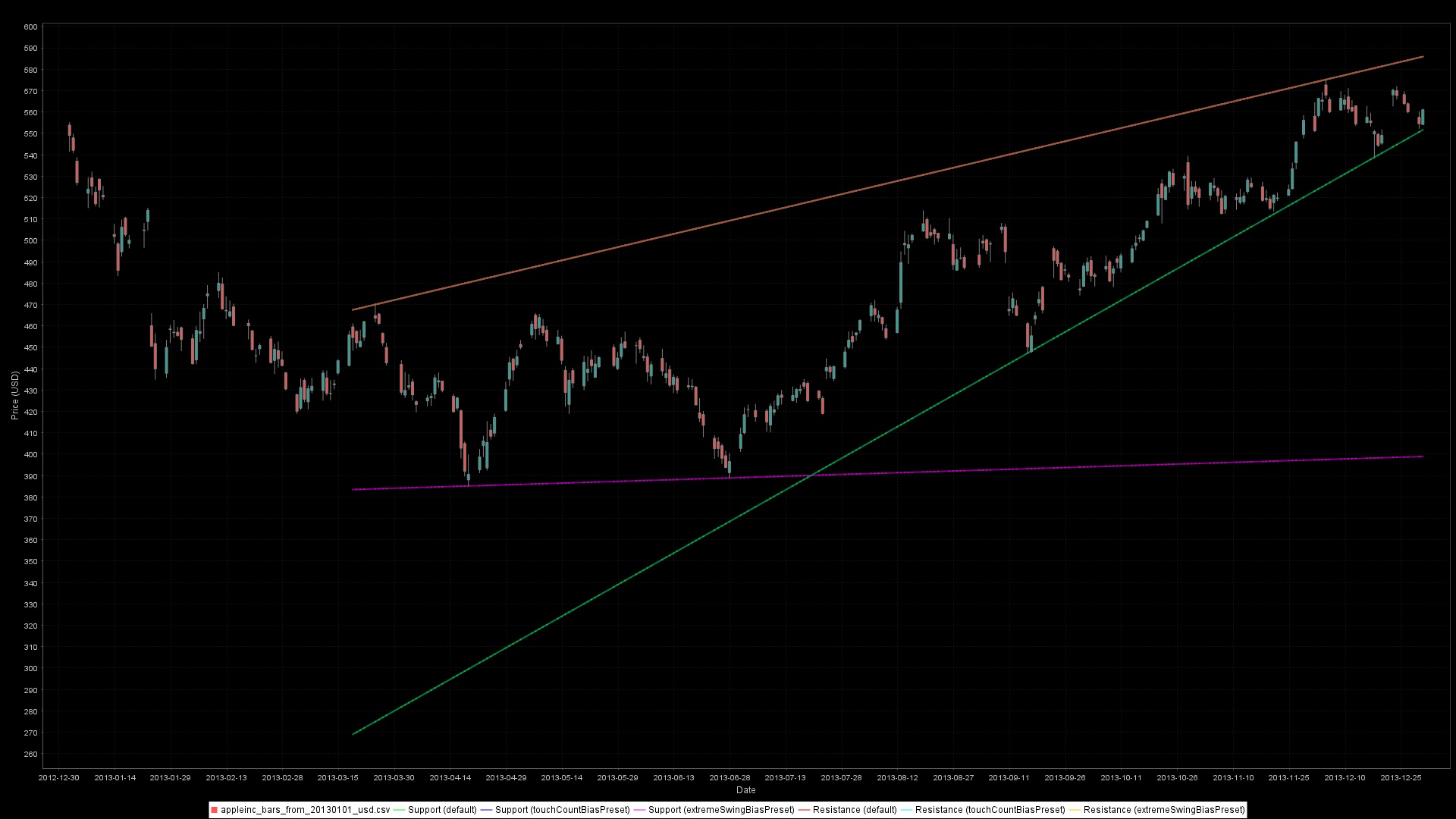 Support/resistance lines from fractal swings. Default (red/green), touch-count bias (cyan/blue), and extreme-bias (orange/magenta) presets make different anchor choices.
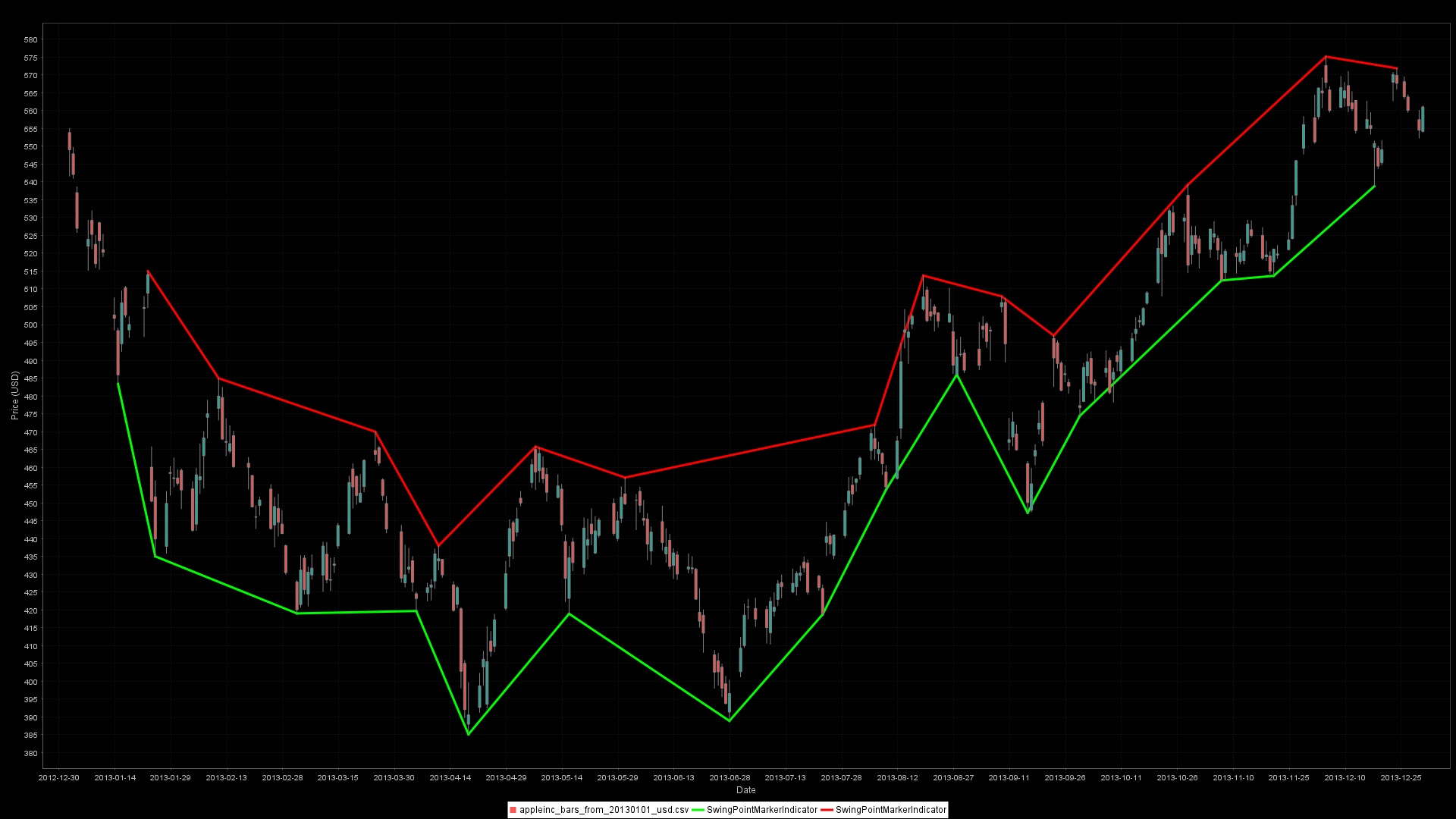 ZigZag-based swings confirmed after ATR-sized reversals. Fewer, higher-conviction swings compared to fractals.
Best practices & pitfalls
- Swings need future bars: fractals confirm only after the
following*window; ZigZag confirms after price moves by the threshold. Guard againstNaNwhen rules fire. - Align parameters with timeframe: wide windows on low-timeframe data will feel sluggish; on daily/weekly charts they remove noise.
- Keep price inputs consistent: pair
RecentZigZagSwingHighIndicatorwith the ZigZag state’s high source andRecentZigZagSwingLowIndicatorwith its low source. - Match lookback to data retention: if you set
series.setMaximumBarCount(250), keep trendlinebarCount <= 250or earlier anchors will be evicted. - Tune tolerance to the instrument: use absolute/tick-size tolerance for low-priced or fixed-tick assets; percentage works well for equities.
- Watch performance with dense swing series: if you detect thousands of swings, lower
maxSwingPointsForTrendlineor raise the reversal/plateau thresholds to avoid combinatorial explosions. - For chart overlays,
.withConnectAcrossNaN(true)connects sparse swing markers into lines; leave itfalsewhen you want discrete marker points.
Rationale Notes (2026-04-27)
- Added the runnable harness guidance from
ta4jexamples.analysis.TrendLineAndSwingPointAnalysis, introduced with support/resistance coverage in commit39194498. - Rechecked current trendline metadata and search-cap wording against
AbstractTrendLineIndicator,TrendLineSupportIndicator, andTrendLineResistanceIndicator.